Picasa Photo Organizer
Picasa Photo Organizer
A free software download from Google. Picasa is software that helps you instantly find, edit and share all the pictures on your PC. Every time you open Picasa, it automatically locates all your pictures (even ones you forgot you had) and sorts them into visual albums organized by date with folder names you know.

-Picasa instantly locates and organises all the pictures on your computer
-You can add passwords to any of your Picasa collections
-Makes advanced editing simple by putting one-click fixes and powerful effects
-Picasa 2 will maintain any albums and any edits that you made to your photos
-And much more
 Read More
ImageGrab
ImageGrab is a simple tool that was designed to help you grab images from a selected video file.
ImageGrab is a nice freeware which opens all kind of video files, SVCD or VCD, Live streams and lets you choose an image to save on a a drive in format bmp or jpg. The jpeg-quality is adjustable. You may even copy it in the clipboard, in order to use it in your favorite application.
This application is heavily using directshow filters (directX video functions). So be sure to have directshow filters (also known as codecs) correctly installed for the videos which you want to operate.
ImageGrab is a nice freeware which opens all kind of video files, SVCD or VCD, Live streams and lets you choose an image to save on a a drive in format bmp or jpg. The jpeg-quality is adjustable. You may even copy it in the clipboard, in order to use it in your favorite application.
This application is heavily using directshow filters (directX video functions). So be sure to have directshow filters (also known as codecs) correctly installed for the videos which you want to operate.

There is no need of an installation, just launch the exe-file. Nothing is copied onto the hard-disks or to the register at start. So uninstall it just by deleting the exe-file. If you saved the preferences (either to the registry or an ini-file, delete the prefernces before deleting the exe-file - see in F10, panel "preferences").
Read More
Portable Inkscape
Inkscape is an Open Source vector graphics editor, with capabilities similar to Illustrator, Freehand, CorelDraw, or Xara X using the W3C standard Scalable Vector Graphics (SVG) file format.
Inkscape is a vector graphics editor that use Scalable Vector Graphics file format.
Inkscape is a vector graphics editor that use Scalable Vector Graphics file format.

Supported SVG features include shapes, paths, text, markers, clones, alpha blending, transforms, gradients, patterns, and grouping. Inkscape also supports Creative Commons meta-data, node editing, layers, complex path operations, bitmap tracing, text-on-path, flowed text, direct XML editing, and more. It imports formats such as Postscript, EPS, JPEG, PNG, and TIFF and exports PNG as well as multiple vector-based formats.
Inkscape's main goal is to create a powerful and convenient drawing tool fully compliant with XML, SVG, and CSS standards. We also aim to maintain a thriving user and developer community by using open, community-oriented development process, and by making sure Inkcape is easy to learn, to use, and to extend.
Read More
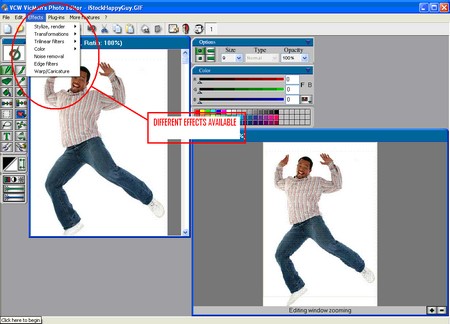
VCW VicMan Photo Editor
VCW VicMan's Photo Editor is a versatile image editor with an intuitive interface and a wide variety of features. This powerful application is user friendly, offering simple image editing, high productivity and easy customization.
Now you don't have to fork out hundreds of dollars for a quality image editor. This award-winning application is freely downloadable and comes with a wide range of essential features for both novice users and professional designers. With VCW VicMan's Photo Editor you can refine your digital photos, draw artwork naturally and effortlessly, producing superb graphics for the web.

 Read More
Photo Pos Lite
Photo Pos Lite is a free lite edition of the professional photo editor Photo Pos Pro. Photo Pos Lite contains many of Photo Pos Pro's tools and features. Despite Photo Pos Lite contains only a part of Photo Pos Pro features it is still a powerful image and computer graphics editor. Using the Lite version you can edit, enhance and manipulate your pictures easily. You can edit and optimize your pictures, print it, resize it, convert it to another format and much more.


The editor also includes some great drawing and painting tools for creating computer graphics. The Lite version offers many tools and functions which include among other things Support of many picture file types (include GIF's/PNG's with transparent background), Support of scanners and digital cameras, Various of Image enhancing and editing tools and functions, Paint Brush Tool, Shapes Tool, Clone Brush Tool, Rich Text Tools, Special Effects, Selection Tools, or Gradients.
Read More


